The right usability testing method is the one that can answer your specific question with the participants and time you have. “Is this design usable?” is too broad to test. “Can a new dispatcher assign a job to a technician without help?” is testable, and it points to a method: a task-based test with people who match that role. Start with the question, then choose the method, setting and measures that fit it.
This guide covers evaluative usability testing: studies that check whether people can use a design. For earlier research into needs and behaviors, see our UX research methods guide. For software to run studies, see our usability testing tools guide, and for a detailed comparison of facilitated and self-guided studies, our moderated vs. unmoderated comparison. Examples use a fictional maintenance-scheduling product, Shiftboard, and are illustrative.
Define the question and participant
Every useful usability test starts with a question precise enough that you will know whether it has been answered. Good questions name a user, a task and the decision the answer will inform.
| Weak question | Testable question | Decision it informs |
|---|---|---|
| Is the scheduling screen intuitive? | Can a dispatcher reassign a late job without help? | Whether the reassignment flow ships as designed |
| Do users like the new navigation? | Can new users find the job history for a site within two attempts? | Whether to keep the new menu structure |
| Is onboarding good? | Do invited technicians understand what their first task is? | Whether the invitation message needs rewriting |
Recruit for the task, not the demographic
Participants should resemble the people who will do the task. For Shiftboard that means people who schedule field work, not a general audience. Experience with the domain matters more than age or location in most B2B products. Screen participants with questions about what they actually do, rather than asking them to describe themselves.
Decide how many people you need
For qualitative testing, Nielsen Norman Group’s guidance on testing with five users remains the standard reference: around five participants per user group usually reveals the main problems, and several small rounds are better than one large round. If you have distinct groups, such as dispatchers and technicians, include a few from each. Quantitative studies, which estimate success rates or compare designs statistically, need far larger samples and a different plan.
Choose test type and setting
Usability tests vary along a few independent dimensions. Choosing on each dimension separately makes the trade-offs clearer.
Moderated or unmoderated
In a moderated test, a facilitator runs the session, gives tasks and can ask follow-up questions. It is best for exploring why people struggle, testing complex flows and working with specialist users. In an unmoderated test, participants complete tasks on their own, usually through a testing platform. It is faster and cheaper for larger numbers but gives up the ability to probe. Nielsen Norman Group’s overview of remote moderated and unmoderated tests notes that unmoderated tests work best for a few specific elements rather than an overall review.
In person or remote
In-person sessions let you see body language, physical context and the environment. Remote sessions remove travel, widen the participant pool and let people use their own setup. The same Nielsen Norman Group article prefers in-person testing where possible but is clear that a remote test is far better than no test, and recommends recruiting a few extra participants for remote studies because no-show rates are higher.
Qualitative or quantitative
Qualitative tests find problems and explain them. Quantitative tests measure how often something happens, such as task success rate or time on task, and need enough participants for the numbers to mean something. Most product teams need qualitative testing far more often.
Specialized methods
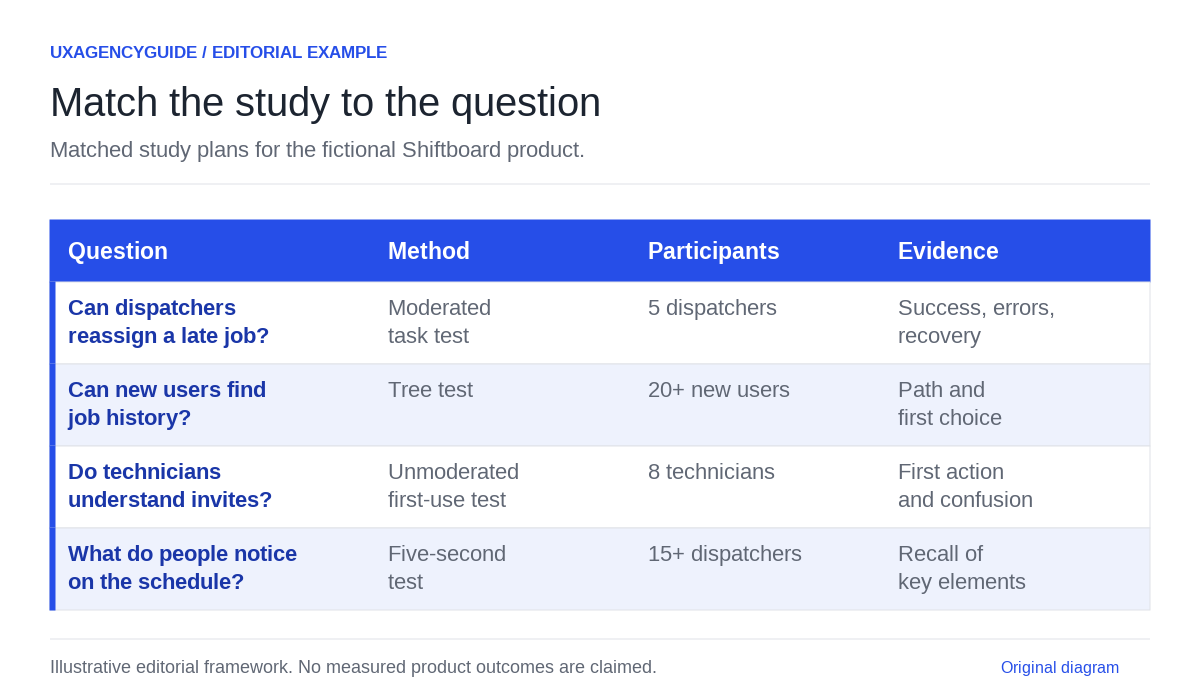
Some methods answer narrower questions quickly:
- Think-aloud testing asks participants to talk through what they are doing. Nielsen Norman Group calls thinking aloud cheap, robust and flexible, while noting that it does not suit detailed statistics and that facilitator prompts can bias behavior.
- First-click tests check whether people start a task in the right place.
- Tree tests check whether a navigation structure makes sense without any visual design.
- Five-second tests check what people notice and remember from a screen at first glance.
Agencies often combine these by product stage. UX Studio’s research services page groups its methods by phase: concept tests during validation; five-second, first-click and navigation tests; and user tests, A/B tests, card sorting and tree testing during development. Fuzzy Math’s research services list moderated and unmoderated testing, task analysis and tree tests, and refer to SUPR-Q, a standardized questionnaire, as a usability measure.
Check what a case study calls testing. GoInvo’s Flux Notes case is specific about its methods: shadowing four oncologists, three expert interviews and weekly feedback sessions with physicians, engineers and a patient advocate. It also says formal user testing at a hospital was still planned. Weekly reviews with domain experts are valuable, but they answer “does this match how clinicians work?” rather than “can a clinician complete this task unaided?”. When an agency describes its research, ask which of the two questions each activity answered.
Write realistic tasks
Tasks are where many usability tests go wrong. A task that tells participants what to click tests whether they can follow instructions, not whether they can use the product.
Nielsen Norman Group’s guidance on turning user goals into task scenarios recommends tasks that are realistic and actionable, and that give the information people need without telling them where to click. GOV.UK’s guidance on moderated usability testing makes the same point: tasks should not give away the answer.
Compare these Shiftboard tasks:
- Poor: “Click Schedule, then drag the job to Sam’s row.”
- Better: “A job at the north site is running two hours late. Make sure Sam’s afternoon work is still covered.”
The better task states a goal and a realistic situation. It does not name interface elements, and there are several ways to complete it, so you learn which one people choose.
Give realistic content
Use realistic names, dates, quantities and data. Placeholder text and perfect sample data hide problems, especially in data-heavy products. If the real product shows 40 jobs a day, the prototype should not show three.
Include difficult cases
Add at least one task that involves an exception, such as a missing technician, a conflict or an error. Exceptions reveal more about a design than the successful path, and they are the situations users find hardest in real use.
Plan the session length
GOV.UK suggests sessions of 30 to 60 minutes, no more than six one-hour sessions a day, and at least 15 minutes between sessions. That rhythm protects both participants and the team’s attention. Three to five tasks usually fit in an hour with time for questions.
Observe behavior and capture measures
During a session, your job is to observe and record, not to help. GOV.UK’s guidance advises facilitators to try to stay quiet while participants work. When someone asks for help, turn the question back: “What would you do if I weren’t here?”
What to record
Record what participants do, where they hesitate, where they go wrong and what they say. Note the moment and the screen. Separate observation (“chose the wrong technician, then corrected after 40 seconds”) from interpretation (“the technician list is confusing”). Interpretation comes later, across sessions.
Useful measures
Even in qualitative studies, a few simple measures help compare sessions and rounds:
- Task success: completed, completed with difficulty, or not completed.
- Errors: wrong paths taken and whether the participant recovered.
- Time on task: useful for comparison between rounds, less so as an absolute number in small studies.
- Confidence or satisfaction: a short rating after each task or a standard questionnaire at the end.
Keep measures consistent across rounds so you can see whether a design change helped.
Involve the team
Invite designers, engineers and product managers to watch sessions live or in recordings. People who see a participant struggle are far more likely to support a fix than people who read a summary. Give observers a simple note template so their observations can be combined.
Interpret findings and limitations
After the sessions, look for patterns across participants rather than reacting to individual comments.
Group and rank problems
List each problem you observed, how many participants experienced it and how severe its effect was. A problem that stopped three of five dispatchers from completing a reassignment is more urgent than one that caused a moment’s hesitation for one person. Severity depends on the consequence of failure in the real task, not only on frequency.
State the limits honestly
Every study has limits. Participants knew they were being observed. Prototypes lacked some real data. A small sample cannot tell you what percentage of all users will struggle. Write these limits into the findings so that decisions are made with the right confidence. In regulated domains, limits matter even more. Guidea’s digital health page describes research with patients, caregivers and providers and lists a project described as prototyping and FDA testing; in that context, test documentation may become part of the product’s regulatory evidence.
Combine with other evidence
Usability testing is strongest alongside other sources. Analytics can show whether a problem seen in five sessions appears at scale. Support tickets can confirm that a confusing step generates questions. In ecommerce, published research such as the Baymard Institute’s large-scale usability findings can help you decide which issues are common across sites, although that research applies to ecommerce and should be used in that context.
Turn findings into design decisions
A usability test is only worth running if its findings change something. Plan how findings will become decisions before the study starts.
Write findings as decisions to make
For each significant problem, write the finding, the evidence and the decision needed. For example: “Four of five dispatchers did not notice that the reassigned job had not been confirmed by the technician. Decision: how should unconfirmed changes be shown on the schedule?” That format makes it easy to assign owners and track outcomes.
Fix, then retest
Change the design and run another small round with new participants. This is where Nielsen Norman Group’s advice on several small rounds pays off: each round checks the previous fixes and finds the next layer of problems.
Keep a research record
Store findings with their evidence and date so future teams can find them. UX Studio’s research page describes collecting insights in a shareable, searchable research system. A repository does not need specialist software; a well-organized shared document works if people use it. What matters is that findings outlive the study.
Know what testing cannot tell you
Usability testing shows whether people can use a design. It does not show whether they will choose to, whether the product solves a problem worth paying for, or how behavior changes over months. Pair testing with interviews, analytics and live product data to answer those questions.
A sample moderated session
A short script keeps sessions consistent and stops facilitators improvising leading questions. Here is an outline for a 45-minute Shiftboard session with a dispatcher.
- Welcome (5 minutes). Explain the purpose: “We’re testing the design, not you. There are no wrong answers.” Confirm consent to record. Ask the participant to think aloud.
- Background (5 minutes). Ask how they schedule work today and when they last had to reschedule a job. This gives context for their behavior later.
- Tasks (25 minutes). Give each task on a card or in the chat, one at a time. Observe without helping. After each task, ask how easy it was on a simple scale and what, if anything, was confusing.
- Follow-up (5 minutes). Return to moments where the participant hesitated: “I noticed you paused on the schedule view. What were you looking for?”
- Close (5 minutes). Ask whether anything else stood out, thank them and explain how their input will be used.
Prepare neutral follow-up prompts in advance, such as “What are you thinking now?” or “What did you expect to happen?”, and avoid questions that suggest an answer, such as “Was that button easy to find?”
Consent and participant care
Usability testing involves people, recordings and sometimes sensitive information, so it needs basic ethical practice even outside regulated fields.
Informed consent. Tell participants what the study is for, what will be recorded, who will see the recordings and how long they will be kept. Get consent before recording, and make it easy to decline or stop.
Data minimization. Collect only the information the study needs. Avoid asking participants to enter real personal or customer data into a prototype; provide realistic test data instead.
Fair incentives. Pay participants fairly for their time, especially specialists such as clinicians or engineers, whose time is expensive and scarce.
Psychological safety. Participants often blame themselves when a design fails. Reassure them that problems they encounter are useful findings about the design, and never make them feel tested.
Specialist settings. In clinical or regulated environments, research may need ethics review, sponsor approval or specific documentation. Agencies that work in these settings, such as Fuzzy Math with surgeons and radiologists in its Clarix case, plan for access and consent as part of the study rather than as an afterthought.
A simple study plan template
Use this structure for each study:
- Question: what you need to learn, in one sentence.
- Decision: what you will do differently depending on the answer.
- Participants: who, how many, and how you will recruit them.
- Method and setting: moderated or unmoderated, in person or remote, and any specialized method.
- Tasks: three to five realistic scenarios, including one exception.
- Measures: success, errors, time and confidence, recorded the same way each round.
- Observers: who will watch, and how they will record notes.
- Limits: what this study cannot tell you.
A plan like this fits on one page, takes an hour to write and saves far more time by keeping the study focused. When you need a structured review of a live product before testing, our UX audit guide explains how expert review and usability testing work together.
Frequently asked questions
What are the main types of usability testing?
The main distinctions are moderated or unmoderated, in-person or remote, and qualitative or quantitative. Specialized methods such as first-click tests, tree tests and five-second tests answer narrower questions about navigation, structure or first impressions. The right choice depends on what you need to learn.
How many participants does a usability test need?
For a qualitative test of one user group, around five participants usually reveals the main problems, and several small rounds work better than one large one. Quantitative studies that compare designs or estimate success rates need much larger samples. Include a few people from each distinct user group.
Can I test a prototype instead of a live product?
Yes. Prototype testing is one of the most valuable uses of usability testing, because problems are cheaper to fix before the build. The prototype needs to be realistic enough for the task you are testing, including the content and states participants will encounter.
Is unmoderated testing as good as moderated testing?
They answer different questions. Moderated sessions let you ask follow-up questions and explore why people behave as they do. Unmoderated tests are faster and cheaper at scale but work best for focused tasks with clear success criteria. Many teams use both at different stages.
Sources & evidence
- Usability (user) testing 101Checked 2026-11-20
- Why you only need to test with 5 usersChecked 2026-11-20
- Thinking aloud: the #1 usability toolChecked 2026-11-20
- Turn user goals into task scenarios for usability testingChecked 2026-11-20
- Remote usability tests: moderated and unmoderatedChecked 2026-11-20
- Using moderated usability testingChecked 2026-11-20
- Baymard Institute researchChecked 2026-11-20
- UX research services for B2B SaaS teamsChecked 2026-11-20
- UX research servicesChecked 2026-11-20
- Clarix healthcare UX case studyChecked 2026-11-20
- Digital health product designChecked 2026-11-20
- Our processChecked 2026-11-20
- GoInvo: Flux Notes (MITRE)Checked 2026-11-23
Specific sources, useful examples and clear limitations make advice easier to assess.
Read the editorial policy